

Insights
How to encrypt Telnet traffic
Protect Telnet with compatible IPsec or TLS endpoints, require encryption, check path coverage, and test that plaintext access is blocked.
Ordinary Telnet does not encrypt credentials or commands. To keep using Telnet, configure authenticated IPsec encryption between compatible endpoints, or use a Telnet-over-TLS implementation supported by both ends. Require encryption rather than allowing plaintext fallback. Encryption protects only the path between its endpoints: if a tunnel terminates at a gateway, the remaining connection to the Telnet device is still plaintext unless separately protected.
Choose an encryption method your endpoints support
For ordinary remote administration, replacing Telnet with SSH is usually preferable when the device supports it. Retain Telnet inside a protected transport when a legacy device or required terminal workflow cannot use SSH.
| Method | Prerequisites | Protected path | Telnet remains in use? |
|---|---|---|---|
| IPsec between compatible hosts | IPsec support, trusted peer authentication, and matching policies on both hosts | Host-to-host transport mode protects traffic between your computer and the Telnet server | Yes |
| Encrypted tunnel ending at a gateway | Compatible encryption endpoints and a gateway that can reach the device | Computer to gateway; onward Telnet traffic remains plaintext unless separately protected | Yes |
| Supported Telnet-over-TLS | Compatible terminal implementations and trusted certificate configuration | Between the TLS endpoints | Yes, within the supported implementation |
| SSH replacement | SSH support on the device and a compatible client | Between the SSH client and server | No |
An ordinary Telnet client connecting to an arbitrary port does not automatically negotiate TLS. Both ends need supported TLS functionality, not merely a different port setting.
Map the protected path before configuring anything
Draw the complete route: your computer, any encryption gateway, and the legacy Telnet device. With host-to-host IPsec, your computer and the Telnet server are the encryption peers, so protection reaches the server. With a gateway-terminated tunnel, protection stops at the gateway.
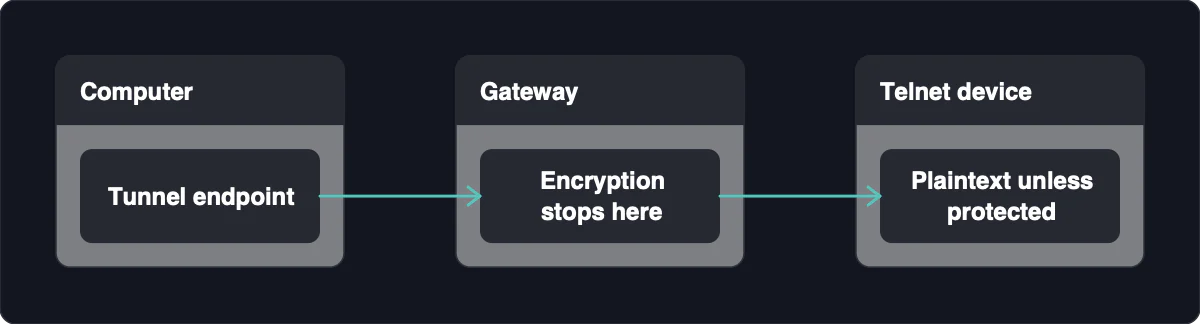
For an unavoidable plaintext segment, place the device on a dedicated management or out-of-band network and limit access to the authorized gateway. This reduces exposure but does not encrypt packets. Private addressing, segmentation, and access controls are useful restrictions, not substitutes for transport encryption.
Configure IPsec to require encryption for Telnet
IPsec policies can protect all traffic between the peers or select a service port. Choose service-specific protection when only Telnet needs encryption, or broader coverage when other traffic between those hosts also needs protection.
- Get authorization and preserve recovery access. Record the existing configuration on both endpoints. Keep console access or another verified recovery path available before changing policies.
- Confirm compatibility. Check that both encryption endpoints support compatible IPsec modes, authentication methods, and encryption settings.
- Choose the endpoint arrangement. Use host-to-host transport mode when your workstation and the Telnet server are the peers. A gateway arrangement protects only the path ending at that gateway.
- Configure trusted peer authentication. Establish mutually trusted authentication using a method both implementations support. Confirm each endpoint is configured to authenticate the intended peer.
- Match the traffic selectors. Define matching policies for the peer addresses, TCP, and the actual Telnet service port. For default TCP port 23, the client policy matches the remote port, while the server policy matches the local port; include return traffic.
- Require encryption and integrity. Apply protection in both directions and reject communication with peers that do not support IPsec. Do not enable unsecured fallback.
- Activate both policies and check negotiation. Confirm an encrypted IPsec security association is active between the intended peers before entering Telnet credentials.
Configuration interfaces vary by implementation; historical policy screens are not a universal procedure for current systems. If negotiation fails, stop and restore the recorded policy through your recovery path rather than allowing plaintext.
Use TLS only with a compatible terminal implementation
TLS terminal access requires compatible behavior at both ends and trusted certificate configuration. Enable the implementation’s documented secure mode, then configure the certificates and trust settings it requires. Changing the destination port alone does not add encryption to ordinary Telnet.
A specific example is IGEL Secure Terminal: its UMS-to-device connection uses TLS/SSL, and only a UMS whose certificate is stored on the device can initiate it. That workflow applies to this implementation, not unrelated Telnet clients or appliances. If certificate validation fails, correct the trust or identity configuration using the implementation’s documentation; do not bypass validation.
Verify encryption and test that plaintext is blocked
A successful login proves that access works, not that the path is protected. Combine connection-state checks, correctly placed packet captures, and a controlled test of what happens without encryption.
- Inspect the negotiated protection. Check IPsec security associations or TLS connection status. Confirm the intended peers, active encryption, authentication status, and, for IPsec, the expected traffic selectors.
- Capture on the network carrying encrypted traffic. With authorization, observe the segment between the encryption endpoints during a session using a disposable test account.
- Check the transport. Look for the expected protected traffic, not readable Telnet credentials or commands. Confirm the session follows the route you mapped.
- Inspect the onward segment separately. If encryption ends at a gateway, check the gateway-to-device connection. Do not treat an encrypted outer tunnel as proof that this segment is encrypted.
- Test rejection of plaintext. During controlled maintenance, with recovery access available, confirm that a client without the required protection cannot access the Telnet service.
- Restore temporary test changes. Return test policies and access settings to their intended state, then confirm protected access still works.
An endpoint or loopback capture can legitimately show application data after decryption. Conversely, unreadable traffic alone does not prove correct peer authentication or complete path coverage.
If a capture on a supposedly protected network segment shows readable session content, or the plaintext-access test succeeds, stop using production credentials. Correct routing and policy coverage, then repeat the checks.
Replace legacy Telnet when the device supports SSH
Transport encryption does not modernize vulnerable Telnet software, secure compromised endpoints, or protect plaintext beyond a tunnel endpoint. When SSH is available, establish and verify authorized SSH access with console recovery available, then disable Telnet after SSH is functioning and tested.
For a device that cannot support SSH, document a time-limited exception, restrict management access, and maintain a retirement path. Protected transport is a containment measure, not a permanent fix for an unsupported device.
Suitable legacy hardware may also work with an SSH-accessible console manager. You connect securely to the manager and use the device’s console from there. That replaces the network Telnet session with console access; it does not encrypt Telnet itself.
