

Insights
Firewall Configuration: Build, Apply and Test a Least-Privilege Ruleset
Learn how to scope firewall rules, preserve administrative access, test allowed and blocked paths, and review changes before migration.
Firewall configuration means defining which traffic a device or network allows or blocks. Start by securing administrative access and identifying your network zones and required connections. Create narrowly scoped rules for sources, destinations, protocols and services, deny unapproved traffic, enable useful logging, and test both allowed and blocked connections before deployment.
Back up the working configuration and review it as your network changes. Check your firewall’s documentation for exact syntax, rule order and traffic scope.
Build a ruleset around required connections
Least privilege means permitting the connections you need rather than allowing broad access and blocking exceptions later. For a self-hosted file service, authorized personal devices need access to that service; unrelated devices do not. Scope permissions to the required addresses and service ports.
Distinguish inbound traffic arriving at the protected device or network, outbound traffic leaving it, and between-zone traffic crossing internal boundaries. Deny unapproved inbound and between-zone connections. Tighten outbound access against documented application needs rather than imposing an unexplained blanket block that could break required dependencies.
Identify the traffic your firewall must control
Build a connection inventory before writing rules. A host firewall controls traffic at a device, while a gateway firewall controls traffic passing through its applicable network policy.
- Inventory devices and services. Identify the assets that need protection, their addresses, service definitions and owners.
- Identify the enforcement point. Trace whether each connection is local, routed between segments, internet-facing or tunneled.
- Define zones and addresses. Separate management, personal-device, guest and service groups where appropriate. Include IPv4 and IPv6 when enabled.
- Record the initiator. Note which device starts each connection and whether the application independently starts connections back.
Scope varies by platform: EnGenius gateway outbound ACL rules exclude VPN traffic, so tunneled paths require separate policy assessment. Application-layer host firewalls also involve app permissions and service behavior: enabling a sharing service on macOS opens a specific port for it. Do not assume a gateway rule covers traffic outside its enforcement path.
Translate each requirement into an explicit rule
Make the source, destination, protocol or service, action and logging decision explicit. Network ACLs can match protocol, source address and port, and destination address and port.
This table expresses policy intent, not executable configuration. All device groups, zones and service names are placeholders; logging entries are recommendations, not platform defaults.
| Purpose | Source | Destination | Protocol/service | Action | Logging |
|---|---|---|---|---|---|
| Access files | Authorized personal devices | Self-hosted file service | Documented file-service definition | Allow | During validation; retain useful events |
| Administer privately | Management devices | Private administration service | Documented administration service | Allow | Access events |
| Isolate guests | Guest devices | Internal service zone | All traffic in this scope | Deny | Useful denial events |
| Reject unapproved traffic | Otherwise-unapproved sources | Destinations within policy scope | Otherwise-unapproved traffic | Deny | Useful denial events |
CIDR notation describes an address range using an address and a prefix length, which specifies its network portion. Source ports identify the sending endpoint; destination ports identify the receiving endpoint. Clients normally select their source ports, so do not fix them without a documented requirement.
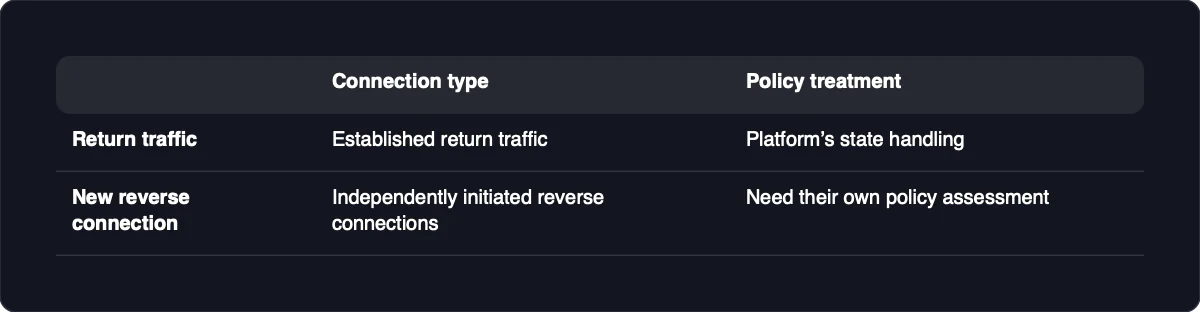
Stateful inspection tracks connections, allowing established return traffic according to the platform’s state handling; independently initiated reverse connections need their own policy assessment. Verify rule evaluation order and whether matching uses applications, ports or both on your actual firewall.
Apply changes without losing administrative access
Preserve a working management path before tightening access. Keep remote administration off the public internet.
- Confirm authorization. Change only systems and policies you are permitted to manage.
- Export the current configuration. Securely store a verified working backup.
- Verify recovery access. Confirm a local console or another documented recovery path works before changing rules.
- Update safely. Follow the vendor’s firmware procedure, replace default credentials with strong, unique passwords, and disable unnecessary accounts.
- Preserve private management. Permit only authorized management devices to reach the required administration service.
- Stage changes. Review the proposed rules before activation.
- Inspect coverage. Check rule order, interfaces, zones and both enabled address families.
- Apply during an appropriate change window. If access or required traffic fails, use the recovery path to restore the saved configuration.
Address translation and access permission need separate checks: NAT changes addressing, while filtering controls permission. Some platforms combine filtering conditions with port-forward settings, but an EnGenius address mapping does not automatically permit inbound traffic.
Test allowed and blocked paths separately
Test the actual application from each relevant source zone, using devices you are authorized to test. A successful connection proves reachability for that tested path, not correctness of the entire policy.
- Test the allowed path. Connect an authorized personal device to the self-hosted file service.
- Test the denied path. Attempt the same service from a guest device that should be blocked.
- Correlate attempts with enforcement. Inspect the matching rule and available logs; rule-specific logging supports monitoring and troubleshooting.
- Investigate mismatches before widening access. For a failed expected allow, check whether the service is listening, then name resolution, route, interface, address family and matching rule. For a successful expected deny, inspect precedence, alternate paths, and both host and gateway policies.
A failed connection alone does not prove firewall enforcement. Ping is not an application test: macOS can answer authorized apps while leaving unauthorized ping requests unanswered. On a stateful firewall, established replies usually do not require an unrestricted reverse-direction allow.
Keep private services and agent access narrowly scoped
Before adding public port forwarding, ask whether the service needs public users at all. If only your devices or authorized agents need it, prefer a private path restricted to required destinations and services, while retaining host controls and application authentication. Keep firewall administration interfaces inaccessible from the public internet.
doxx.net is a private network with documented firewall controls and authorized API/MCP tools for managing network resources. If that fits your private-access task, use the website’s Get Started and Download paths to create an account, download the app and connect a device or agent.
For agent-generated changes, specify explicit policy intent, bound the agent’s authorization, review the proposal and keep validation separate from the language model’s proposal. Generated rules need additional validation beyond ordinary human-reviewed changes; this is general guidance, not a claim about automatic doxx.net safeguards. Network restrictions do not prevent prompt injection, malware or all data leakage.
Review rules after changes and before migration
Keep policy aligned with service, address and topology changes. A rule that appears unused may still support an infrequent but required connection.
- Record ownership and purpose. Keep a change record for every configuration change.
- Review logs. Investigate unexpected allows, denials and changes in traffic patterns.
- Inspect stale objects. Check unused or overlapping rules and addresses before removing them.
- Patch and preserve recovery. Update supported systems and retain verified working backups.
- Retest changed paths. Repeat allowed and denied tests after service, address or topology changes.
During migration, preserve policy intent but do not assume direct export/import between different configuration models. Check target defaults, NAT behavior, object definitions and rule semantics: application-aware rules may become port-based rules on another platform. Test the replacement separately and plan a reversible cutover before retiring the working firewall.
